

Redundancy is validated by testing a specific failure. Record uncovered risks and recovery time.
For: Integrators and show-continuity owners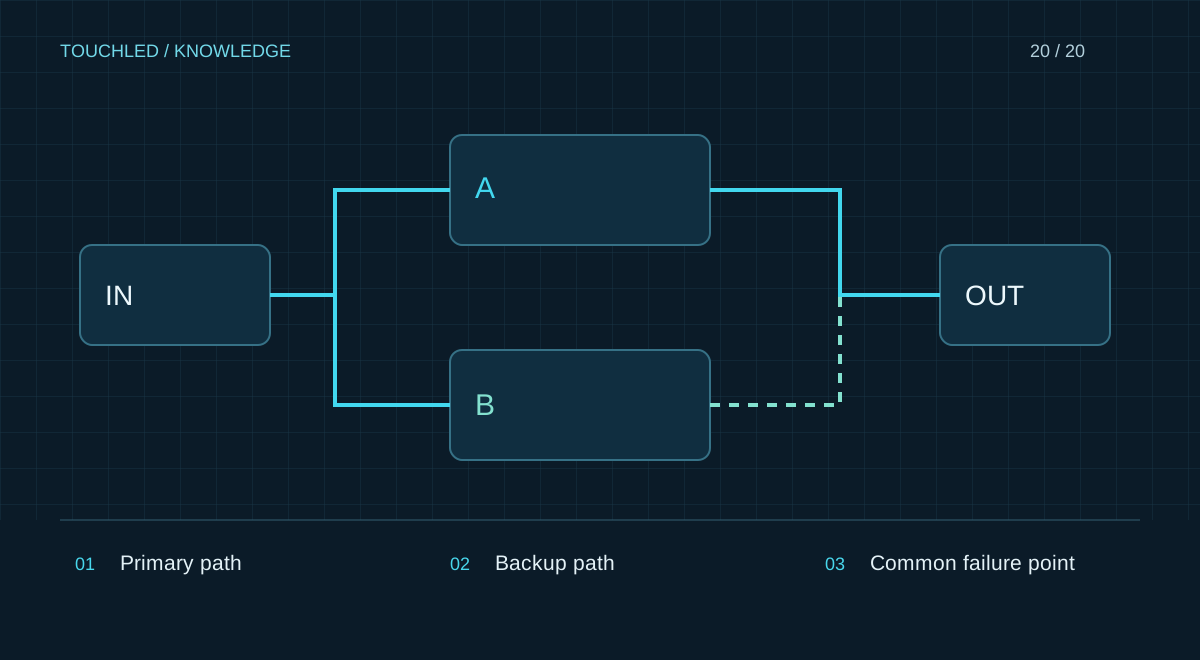
Start with failure scenarios
Define acceptable interruption and the consequences of losing the display. An information lobby and a live broadcast can have different requirements. List possible failures: source, controller, link, cabinet, power or operator error. A second cable covers only certain events when the scheme is supported and configured.
A second connector does not guarantee continuity: a backup port may need configuration and does not add usable pixel capacity.
Describe redundancy coverage and limits
For each risk record a backup path, switching method and remaining common failure points. Two devices on one unvalidated power circuit do not eliminate that circuit's failure. Cables routed together can retain a common physical risk.
| Failure | Possible measure | Also check |
|---|---|---|
| Video source | Backup source | File, format, audio and switching |
| Data link | Supported backup route | Configuration, load, shared segments |
| Controller | Backup in a supported architecture | Synchronization and current settings |
| Configuration error | Validated backup files | Recovery time and procedure |
Test failover before the event
Plan and approve tests on a safe bench or in a dedicated window. Do not create power faults or disconnect unknown links during a live show. For each permitted scenario record observed interruption, image behaviour and recovery procedure.
Automatic failover and manual recovery are different outcomes. Record exactly what was tested and which action the operator must perform.
Keep backup current
After changing mapping, firmware or sources, update backup configurations and repeat affected tests. A backup laptop with outdated content is available but fails the task. Assign a pre-show check owner and keep a concise operator procedure.
Practice: backup exists only on paper
A spare source exists but lacks current content and the required adapter. Switching after the primary fails does not restore the show. Assess backup as a complete workflow including files, connections, access rights and operator actions.
Before a critical event check the backup readiness sheet and assign authority to switch. Record changes afterwards so the next operator receives a current procedure rather than the original drawing.
- A duplicated output does not add usable capacity.
- Backups require a validated restoration procedure.
- List uncovered risks explicitly.
Before your next step
- Acceptable interruptions are defined
- Backup addresses the chosen risks
- Common failure points are identified
- Failover is tested and documented
- Backup settings and content are current
Sources and applicability
This is an editorial guide, not validation of a particular product configuration. Teaching examples are not TOUCHLED product specifications or prices.
These sources explain technical principles and the models they describe. Check current documentation for the exact variant and firmware: a cited revision is not necessarily the latest or applicable to all equipment.
Found an issue? Email info@touchled.ru with the article title and section.
Apply this to your project
Share dimensions, site photos and the display's purpose. We will identify open questions and discuss the configuration.
Discuss a project