

Validate a filming display using recorded tests of the actual camera and operating mode.
For: Video engineers, camera operators and producers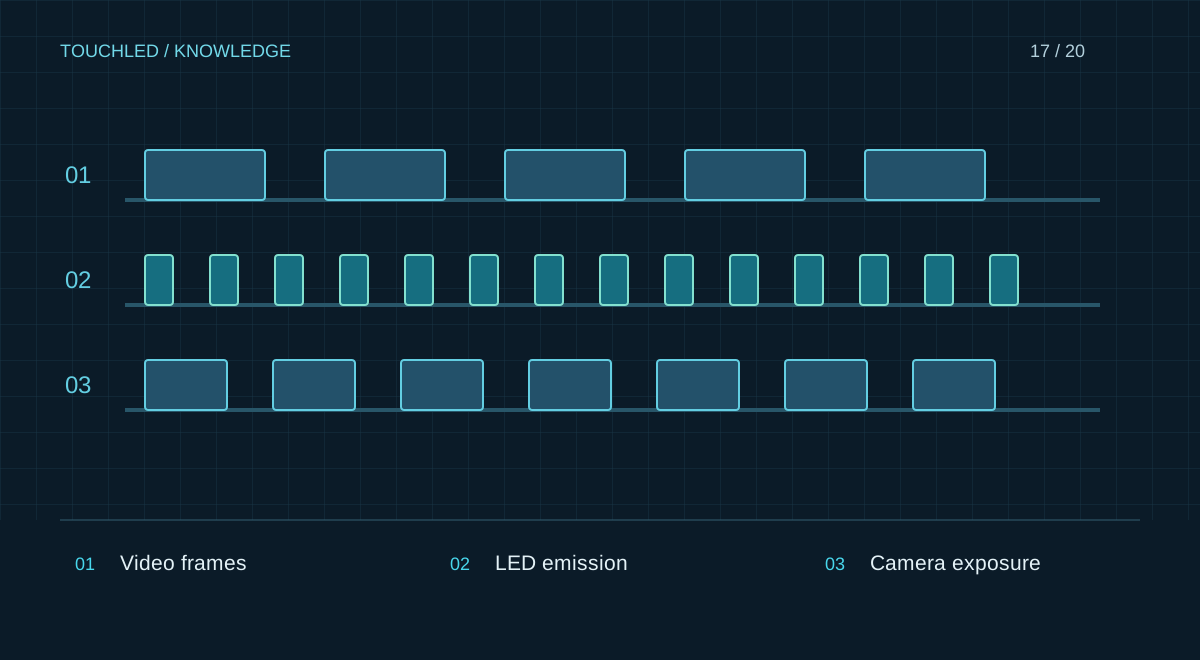
Distinguish three timing processes
The source produces frames, the LED system drives light output, and the camera exposes and reads the image. These processes are related but cannot be described by one frequency. A high rated refresh rate does not guarantee freedom from banding at every shutter setting, brightness and camera configuration.
Genlock and specialized exposure-matching functions require a supported configuration. A feature on one device does not establish support throughout the chain.
Banding and moiré need different checks
Banding can arise from timing interactions between camera and LED driving. Moiré arises from spatial interactions between the display structure and the imaging system. Changing one refresh parameter therefore cannot universally solve both.
Test actual framing, lenses, distances, focus and camera motion. Looking at the screen on site does not replace reviewing recorded footage on a reference monitor.
Create a camera test protocol
Record settings so a successful test can be repeated. Change one parameter at a time and save reference clips. Enable specialized modes using the actual device manuals; they may affect brightness, load or available settings.
| Stage | Parameters |
|---|---|
| Display | Module, card, firmware, brightness, mode |
| Signal | Resolution, frame rate, synchronization |
| Camera | Model, frame rate, shutter, readout mode |
| Optics | Lens, focal length, position |
| Result | Clip, observation, suitability for purpose |
Validate the working scenario
Show faces, grey fields, gradients and real stage graphics. Test close and wide shots, movement, production lighting and content changes. Record accepted settings as part of handover. A different camera or filming mode needs a new check; an earlier display test is not universal validation.
Practice: a clean wide shot but a problematic close-up
A wide rehearsal shot looks acceptable. A close-up with another lens reveals a spatial pattern. Repeat the test for that exact shot, recording position, focal length, focus and system settings together. Changing shutter settings may affect banding but cannot guarantee removal of spatial moiré.
Agree supported framing and settings with the camera team. If a broad filming range is required, include it in equipment selection and pre-purchase demonstrations rather than waiting until venue handover.
- Review recorded footage, not only the camera monitor.
- Do not promise artifact-free results for every camera.
- Retest after changing display mode.
Before your next step
- Camera, optics and framing are known
- All system modes are recorded
- Banding and spatial moiré are checked
- Reference footage is saved
- Accepted settings are part of handover
Sources and applicability
This is an editorial guide, not validation of a particular product configuration. Teaching examples are not TOUCHLED product specifications or prices.
These sources explain technical principles and the models they describe. Check current documentation for the exact variant and firmware: a cited revision is not necessarily the latest or applicable to all equipment.
Found an issue? Email info@touchled.ru with the article title and section.
Apply this to your project
Share dimensions, site photos and the display's purpose. We will identify open questions and discuss the configuration.
Discuss a project